
Control Your Team
Give your hosts full control over their workflow with a flexible and secure dashboard. With host permissions, your team members can manage meetings, bookings, settings, availability, and integrations — all in one place. Tailor access levels so every host can work efficiently while maintaining system security and consistency.

Control Your Team with Host Permissions
Create professional, fully branded email templates for every stage of your booking process. From confirmations to reminders, you can customize content, layout, and design without coding.
Host Settings Management
Easily manage host-specific settings and preferences from a centralized control panel. Customize how each host interacts with the system while maintaining overall platform consistency.
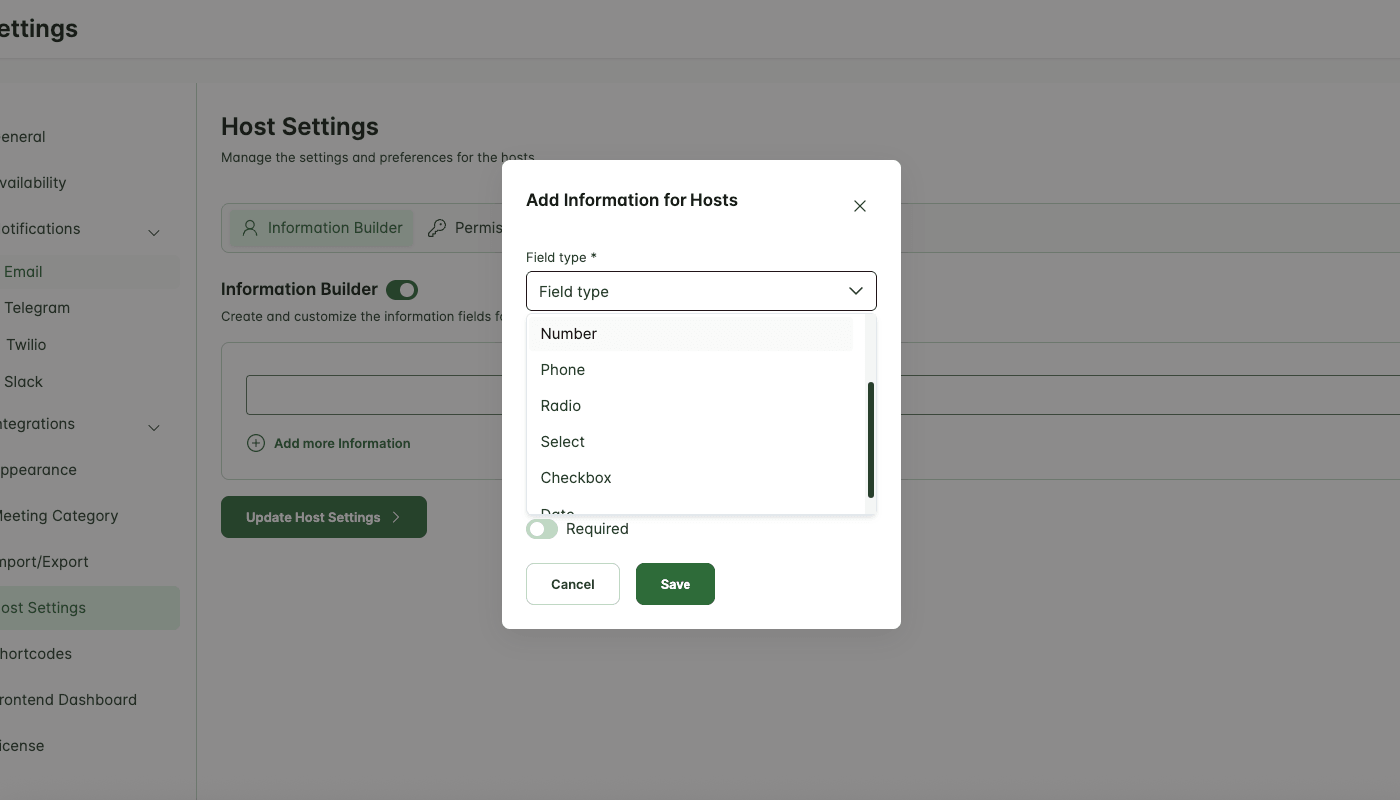
Information Builder
Create and customize information fields for your hosts effortlessly. Collect essential details such as contact info, roles, or any business-specific data you need.
Custom Information Fields
Add unlimited custom fields to store additional host details such as certifications, notes, or internal data tailored to your business needs.
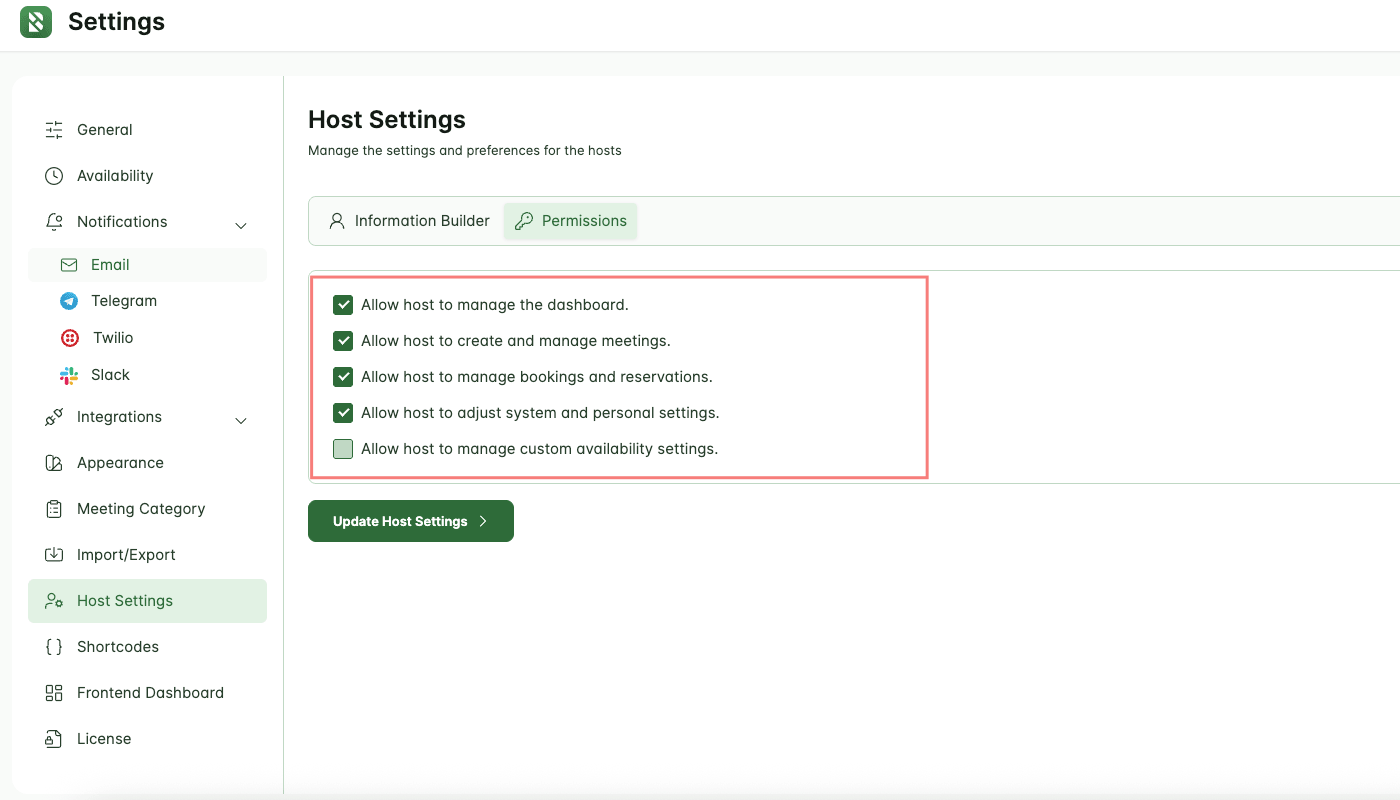
Host Permissions
Give your team the flexibility to manage their workflow while maintaining full control over access and security. Assign permissions, customize settings, and empower hosts to operate efficiently from a centralized dashboard.
A quick look inside the backend editing panel.
Explore the backend editing panel to understand how powerful and intuitive the editing experience is.
Step by Step Guide
Full Team Control, One Dashboard
Monitor, manage, and coordinate your team with instant insights. Keep everyone aligned and productive without the hassle.
Powered by Themefic’s Legacy of Excellence
Hydra Booking reflects the same commitment to quality that Themefic is known for, backed by the positive reviews our other plugins have earned.

Xavier C
Triptohelp.org
25 Aug, 24
‘I recently worked with the Themefic team for my WordPress needs and their Tourfic Pro plugin. Their commitment to customer satisfaction and excellence was evident from the start.’

Antonio martinez
@antoniomartimartinez
07 May, 25
‘HydraBooking is an amazing plugin! It’s easy to use, looks professional, and works perfectly for booking appoin-tments. I love how simple it is for clients to schedule a session, and it saves me a lot of time...’

Zoran Railic
@zoran.railic
19 Nov, 24
‘This is an excellent plugin that works flawlessly and offers plenty of customization options. I must also commend the support team for their quick response to my request...’

Melle meijer
@mellemeijer
24 Nov, 2023
‘Ultimate Addons for Contact Form 7 made our campaign form easy and user-friendly, adding features like dynamic dropdowns. Exactly what we needed—great plugin!’
Experience Next-Level Tools
Discover the powerful features that give you complete control and help you stay ahead of the game.
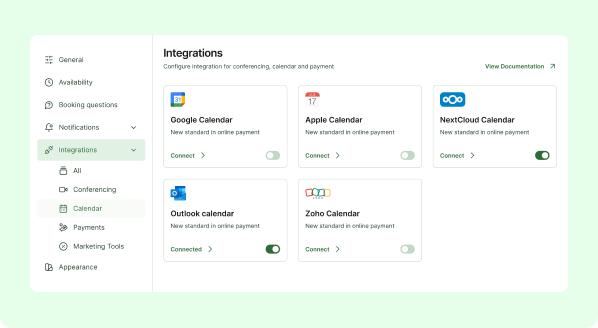
Calendar & Scheduling
Effortlessly manage your appointments by integrating with your favorite calendar services.
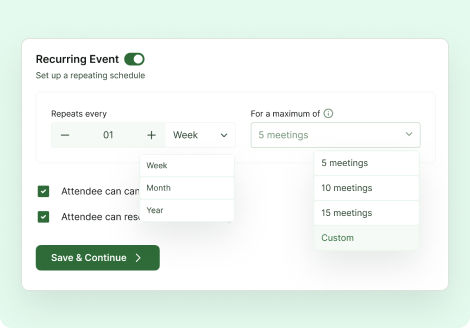
Recurring events
Make recurring appointments easy for your clients with HydraBooking’s Recurring Event feature
Premium Feature
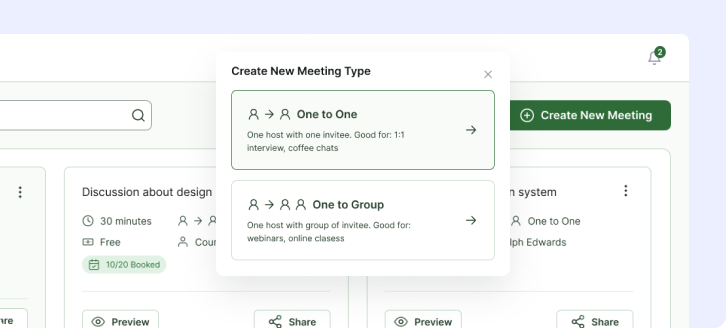
Meeting Types
Define and manage different types of meetings, from one-on-one sessions and interviews to group webinars and online classes.
Frequently Asked Questions
What permissions does a host have?
Hosts can manage dashboards, meetings, bookings, settings, availability, and integrations, giving them full control over their workflow without affecting other team members’ access.
Can I restrict certain features for a host?
Yes. Permissions are fully customizable so you can grant or restrict access to specific features based on roles or responsibilities.
How does the host manage availability?
Hosts can define custom availability schedules, block time slots, and set rules to ensure bookings fit their calendar and preferences.
Can hosts manage integrations with external tools?
Yes. Hosts can connect, configure, and manage external services like calendars, email systems, or communication platforms directly from their dashboard.
Does this affect team-wide settings?
No. Host-specific settings and permissions are scoped to individual hosts. Core system settings remain protected unless explicitly allowed.
