
Flexible Meeting Locations
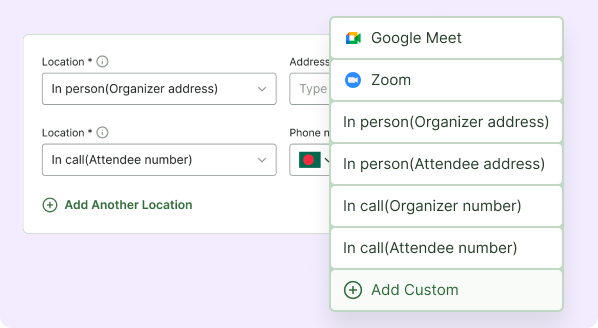
Host meetings your way — online, offline, or anywhere in between. Easily set and manage meeting locations, whether it’s a virtual link, a physical address, or a custom location of your choice. Give participants clear directions and seamless access, ensuring every meeting starts smoothly and professionally.
Seamless Contact & Communication
Make communication simple and accessible by providing clear contact details for every meeting. Ensure participants can easily reach the organizer when needed, improving coordination, trust, and overall meeting experience.
Virtual Meeting via Zoom
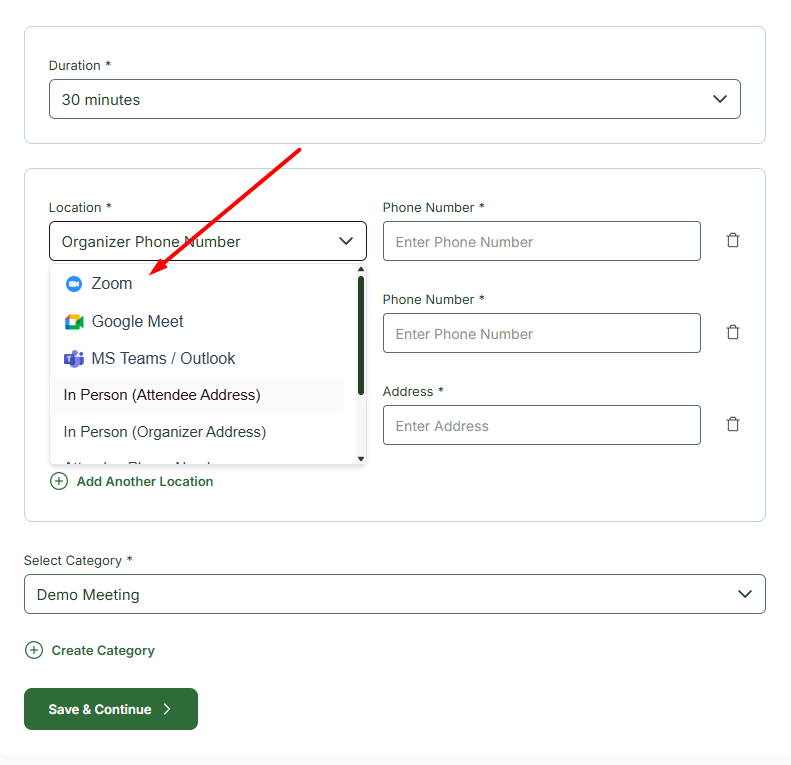
Host online meetings with full video, audio, and screen sharing capabilities. Participants can join instantly using a secure Zoom link, ensuring smooth and professional virtual sessions.
Virtual Meeting via Google Meet
Connect seamlessly with participants using Google Meet. Share meeting links and collaborate with reliable video and audio support.
Virtual Meeting via MS Teams / Outlook
Schedule and manage meetings directly through Microsoft Teams or Outlook. Keep all participants updated and synced with your calendar.
In-Person Meeting at Attendee Location
Set the meeting at the attendee’s address for convenient face-to-face sessions. Provide clear directions to ensure punctual attendance.
In-Person Meeting at Organizer Location
Host meetings from your own location and share the organizer’s address with participants. Ensure everyone knows exactly where to go for in-person sessions.
Phone Meeting via Attendee Contact
Allow participants to join or coordinate via their phone for quick and direct communication. Ideal for last-minute updates or urgent clarifications.
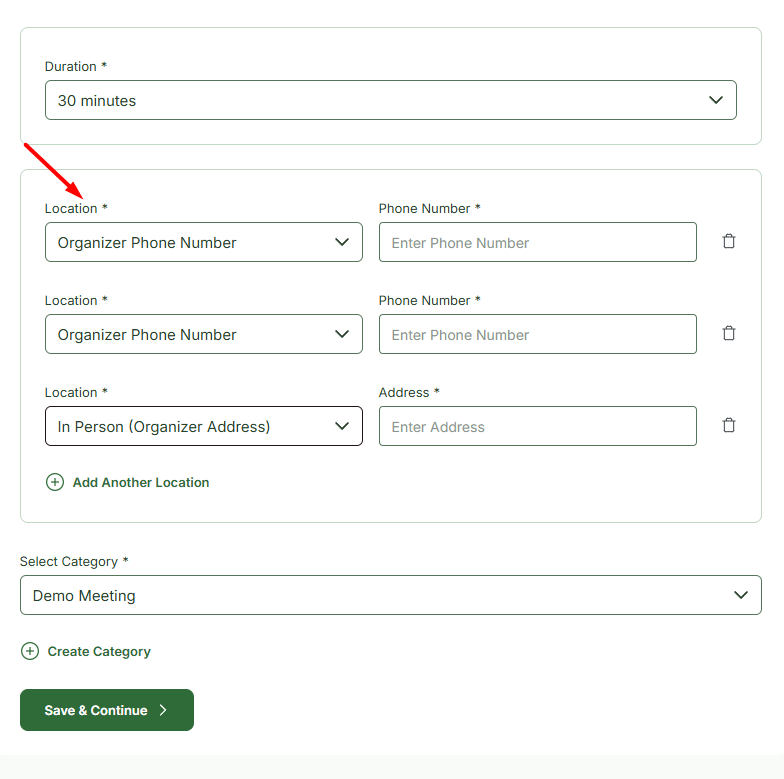
Phone Meeting via Organizer Contact
Display the organizer’s phone number for fast and direct communication. Participants can reach out for urgent questions, updates, or clarifications before or during the meeting.
Custom Meeting Location
Define fully custom meeting locations or instructions. Tailor each session to your workflow, platform, or special requirements for maximum flexibility.
A quick look inside the backend editing panel.
Explore the backend editing panel to understand how powerful and intuitive the editing experience is.
Step by Step Guide
Choose the Perfect Meeting Spot
From online calls to in-person meetings, manage all your locations in one place. Keep your schedule organized and your participants informed.
Powered by Themefic’s Legacy of Excellence
Hydra Booking reflects the same commitment to quality that Themefic is known for, backed by the positive reviews our other plugins have earned.

Xavier C
Triptohelp.org
25 Aug, 24
‘I recently worked with the Themefic team for my WordPress needs and their Tourfic Pro plugin. Their commitment to customer satisfaction and excellence was evident from the start.’

Antonio martinez
@antoniomartimartinez
07 May, 25
‘HydraBooking is an amazing plugin! It’s easy to use, looks professional, and works perfectly for booking appoin-tments. I love how simple it is for clients to schedule a session, and it saves me a lot of time...’

Zoran Railic
@zoran.railic
19 Nov, 24
‘This is an excellent plugin that works flawlessly and offers plenty of customization options. I must also commend the support team for their quick response to my request...’

Melle meijer
@mellemeijer
24 Nov, 2023
‘Ultimate Addons for Contact Form 7 made our campaign form easy and user-friendly, adding features like dynamic dropdowns. Exactly what we needed—great plugin!’
Experience Next-Level Tools
Discover the powerful features that give you complete control and help you stay ahead of the game.
Frontend Dashboard
Let hosts and admins manage bookings directly from the frontend - no need to access the WordPress backend.

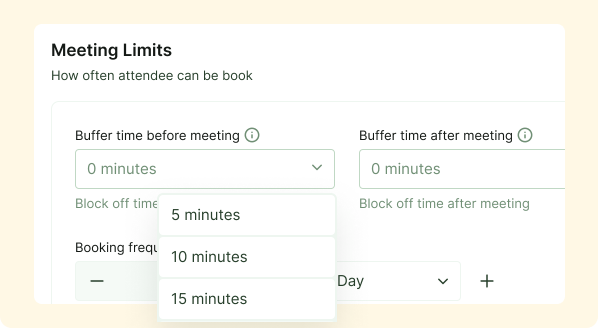
Maximize Your Time
Using Buffer time will automatically calculates your availability, keeping your schedule organized and stress-free
Premium Feature
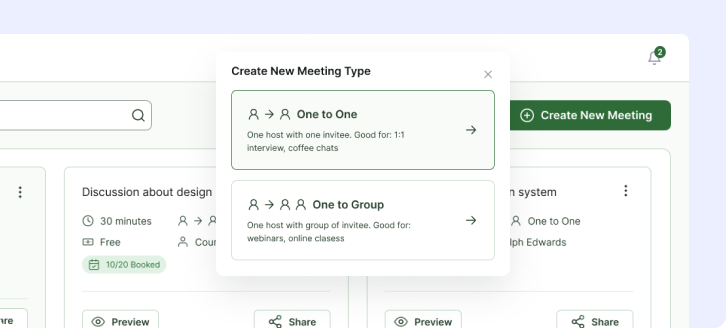
Meeting Types
Define and manage different types of meetings, from one-on-one sessions and interviews to group webinars and online classes.
Frequently Asked Questions
Why should I display the organizer’s phone number?
Providing the organizer’s phone number ensures participants can quickly reach out for urgent matters, reducing confusion and missed meetings.
Can I use a separate number for meetings?
Yes. You can assign a dedicated meeting phone number to maintain professionalism and protect personal contact information.
Is the phone number visible to all participants?
Visibility can be controlled based on your system settings, allowing you to decide who can view the contact details.
Can I update the phone number anytime?
Absolutely. Both organizer and meeting phone numbers can be updated at any time from the dashboard or meeting settings.
Does this improve meeting reliability?
Yes. Clear contact information reduces communication gaps and helps ensure meetings run smoothly without unnecessary delays.
